We have compiled a list of security measures to implement to either prevent ransomware or limit the damage. Organizations need not implement all of these in order to prevent ransomware. However, these are various strategies that can be implemented depending on the company. Security measures such as “application whitelisting” will prevent most malicious software on its own. Overall, most of these strategies are best practice and should be implemented as part of a larger security framework such as the CIS Top 20 Security Controls.
Endpoint Protection – Application Whitelisting & antivirus. If application whitelisting is fully implemented, this will stop most malicious software on the computer. Application Whitelisting is a much stronger security measure than antivirus.
File Backups – Regularly store backups of important files. Test the restore process to confirm backups are viable.
User Profile Protection – Block/Whitelist execution of programs in the user profile folders.
Block/Whitelist Office Macros – Only allow signed macros by authorized sources.
Egress Filtering on Firewall – Only permit needed traffic outbound
Network Share Permissions – Restrict access to network shares to a need to know basis.
Intrusion Prevention System (IPS)
Network Segmentation
Vaccines – Ransomware will not encrypt the same machine with multiple encryption keys. In order to do this, the keys are stored in the registry. There are several programs that will create these “vaccines”.
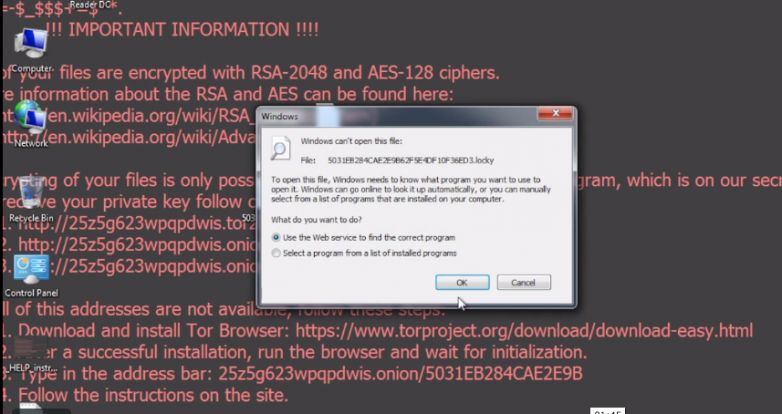
Stern Security Labs analyzed a Locky ransomware sample. The following video shows an actual Locky ransomware attack on a Windows 7 machine. Watch how fast the ransomware encrypts the files on the computer. The computer is encrypted within one minute of clicking on the malicious “invoice.pdf” file!
On January 22nd, 2016, the Food and Drug Administration released a draft guidance document titled “Postmarket Management of Cybersecurity in Medical Devices”. (Food and Drug Administration). This important document addresses the need for security throughout the lifecycle of several medical devices. Improving medical device security is a subset of President Obama’s February 19th, 2013 Executive Order 13636 – “Improving Critical Infrastructure Cybersecurity”.
This timely document comes after several high profile hacks of medical devices including, but not limited to, drug infusion pumps. As this is a draft, the FDA is requesting comments and suggestions from professionals in the industry. Suggestions can be electronically submitted within 90 days to http://www.regulations.gov. This is a great opportunity to help shape an important initiative.
Let’s breakdown the highlights of the “Postmarket Management of Cybersecurity in Medical Devices” document.
Highlights
Connected Medical Device Security– Networked medical devices can be vulnerable to cybersecurity threats. We have seen an increase in vulnerabilities and malware affecting networked medical devices so it is great to see a focus on this within the document.
Security Throughout Product Lifecycle – “Manufacturers are encouraged to address cybersecurity throughout the product lifecycle, including during the design, development, production, distribution, deployment and maintenance of the device.” (Food and Drug Administration)
Risk Analyses – “FDA recommends that manufacturers conduct cybersecurity risk analyses that include threat modeling for each of their devices and to update those analyses over time”
Proactive Security – The FDA states that proactively analyzing security within medical devices increases patient safety and reduces risk to public health.
No Need to Recertify – Some medical device manufactures have tried to avoid fixing security issues in their products because they have stated that doing so would require them to go through a lengthy recertification process with the FDA.
Notification for Serious Vulnerabilities – The FDA must be notified if a discovered vulnerability would “present a reasonable probability of serious adverse health consequences or death” if exploited.
Shared Responsibility of Cybersecurity – “Cybersecurity risk management is a shared responsibility among stakeholders including, the medical device manufacturer, the user, the Information Technology (IT) system integrator, Health IT developers, and an array of IT vendors that provide products that are not regulated by the FDA.”
Encourage NIST Cybersecurity Frameworks – The FDA encourages the adoption of the NIST “Framework for Improving Critical Infrastructure Cybersecurity” to help manufacturers manage cybersecurity risk throughout the life of the product.
Timely Response – While the document does not give a specific timeframe for responding to a security issue, it does say that manufacturers should respond to security vulnerabilities in a “timely fashion”. Additionally, the document states that manufactures should deploy “mitigations that address cybersecurity risk early and prior to exploitation.”
Vulnerability Disclosure – Manufactures should adopt a “coordinated vulnerability disclosure policy and practice” and provide information on work-arounds and temporary fixes to mitigate vulnerabilities.
Recertification Issue in Detail
The “No Need to Recertify” clause is especially important. Some medical device manufactures have tried to avoid fixing security issues in their products because they have stated that doing so would require them to go through a lengthy recertification process with the FDA. However, this has never been the case. The “Postmarket Management of Cybersecurity in Medical Devices” document reiterates the FDA’s previous comments on this topic that stated that an FDA review is necessary “when a change or modification could significantly affect the safety or effectiveness of the medical device. 21 CFR 807.81(a)(3), 814.39.” or if the proposed change “could significantly affect the safety or effectiveness of the medical device. (U.S. Department of Health and Human Services; Food and Drug Administration; Center for Devices and Radiological Health; Office of Compliance; Office of Device Evaluation)”
Additional Thoughts
A penalty for not addressing security issues was never mentioned in the document. Many companies ignored the HIPAA compliance guidelines until noncompliant organizations started getting fined.
Works Cited
Food and Drug Administration. “FDA outlines cybersecurity recommendations for medical device manufacturers.” 22 January 2016. U.S. Food and Drug Administration.
U.S. Department of Health and Human Services; Food and Drug Administration; Center for Devices and Radiological Health; Office of Compliance; Office of Device Evaluation. “Guidance for Industry – Cybersecurity for Networked Medical Devices Containing Off-the-Shelf (OTS) Software.” U.S. Food and Drug Administration.
All Apple users need to enable two-step verification on their iCloud accounts if they have not already. This protects your account by confirming your identity through a text message in addition to your password. So even if someone steals your password, they would need to steal your phone as well to get into your iCloud account.
Apple has released easy to follow instructions on enabling this feature on your account: http://support.apple.com/en-us/ht5570. Enabling this feature is very important because with access to someone’s iCloud account, an attacker can read a person’s text messages, emails, view photos, and remotely erase their devices.
We’re sure that you look good, but we still don’t want to see your iCloud pictures on the internet 🙂 So please enable two-step verification on your iCloud account.
What is the most important account that you own?…. Most people would say it’s their bank account, but many underestimate the value of their email account. If someone gets access to your email account, they can often access all of your other electronic accounts including your bank, LinkedIn, Facebook, Amazon, and more. With access to your email account, a malicious person can click the “I forgot my password” link on all of your other accounts. This password reset link usually goes straight to your email account that they already hacked! This is why your email account is so important and we will show you how to protect it with two-factor authentication.
What is two-factor authentication? It is two of the following:
Something you know (ex. password, PIN, or secret question)
Something you have (ex. cellphone, badge, RSA token)
Something you are (a physical characteristic), for example, fingerprint, retina scan or voice activation.
Here is an example. An individual walks into a high security area and they are asked for their ID badge (something they have) and their fingerprint (something they are). This is one way that two-factor authentication works in the real world, but it is also possible on the computer!
Gmail, Yahoo, and Outlook all allow you to enable two-factor authentication on your account! So if you log into your email account from an unfamiliar computer, you type in your password (something you know) and then a text message with a PIN will be sent to your phone (something you have) to confirm it is actually you. Now, in order to get access to your email account, someone would need to steal both your password AND your phone which is highly unlikely.
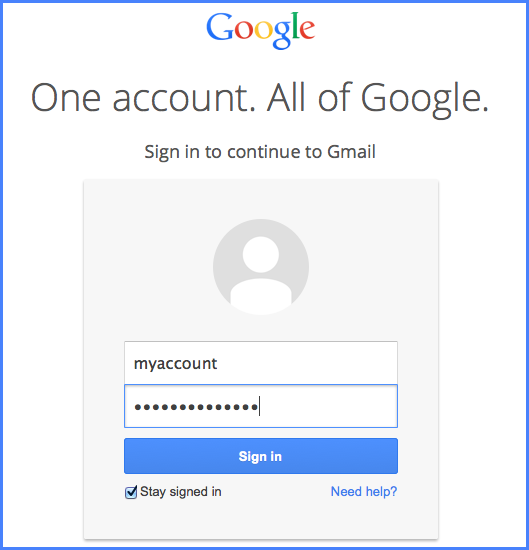
Let’s walk you through the process in Gmail:
1. Login
Log into your account
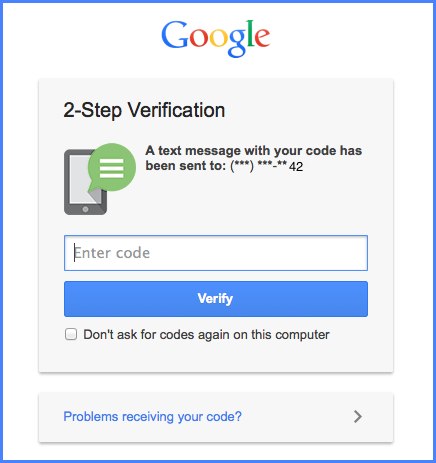
2. Enter code
If you log in from an unfamiliar device, Google will send a text to your phone and ask you to type in the code that appears. You can tell Google to “don’t ask for codes again on this computer” if this is a trusted device.
3. Access Granted
After you type in the code, you are taken to your email!
The process is slightly different if you check your email through an application other than your web browser, for example, the mail app on your mobile. In those cases, you will need to ask Google to give you an “application specific password” that you will enter once for this app (see Google instructions below).
Instructions
Now that you are excited and ready to set this up on your email account, here are instructions for the three major email service providers. It’s very easy and gives you a high level of security!
Yahoo:https://help.yahoo.com/kb/activate-sign-in-verification-sln5013.html. For Yahoo, choose the option to only allow your phone (text message) to be used as your verification. They also offer “secret questions” as a verification, but this is NOT a second factor because it is still “something you know” just like your password.
Conclusion
Two-factor authentication is a great way to protect your online accounts from being hacked. Your email accounts are not the only ones that you can protect with two-factor authentication. Some other services that offer two-factor authentication are Facebook, LinkedIn, Twitter, Evernote, Paypal, Apple, Dropbox, and some banking websites. Many websites offer secret questions as an additional security measure to identify you, but this is NOT two-factor authentication because your password and secret questions are both “something you know”. You need “something you have” (ex. a phone) or “something you are” (ex. fingerprint) in addition to your password (something you know) in order to make it two-factor authentication.
Ask your online service providers to offer two-factor authentication if they do not already because passwords are not enough to protect you these days!